
Best QR Pet Tag 2026: An Honest Comparison of Tagback, PetHub, Dynotag, and PetMedAlert
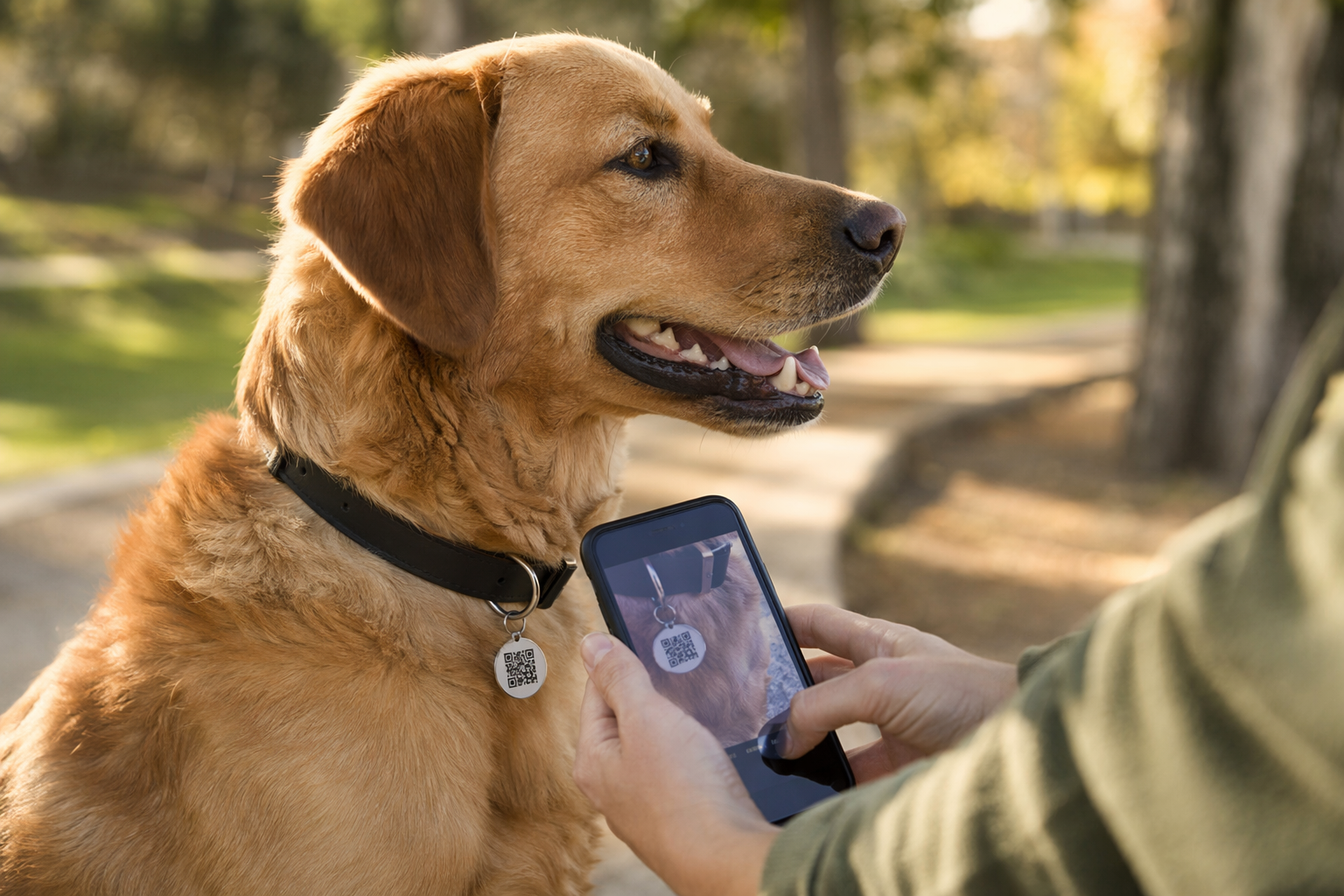
From the outside, QR pet tags all look the same. A small disc or plate on a collar with a scannable square. But the moment a stranger finds your dog and points their phone at that tag, the differences become stark — and they can be the difference between a reunion that takes 20 minutes and one that takes 20 hours.
This is a comparison of the four QR pet tag services most commonly recommended in 2026: PetHub, Dynotag, PetMedAlert, and Tagback. The goal is not to crown a winner — it's to help you understand which service fits your situation. Each has genuine strengths. Each has real trade-offs.
What to Look for in a QR Pet Tag Service — 6 Criteria
Before comparing services, it helps to know what actually matters when your pet is lost. Here are the six criteria that determine how well a QR tag service performs in a real recovery scenario:
- Finder experience — app vs no-app. Does the finder need to download an app to see your contact info? Every extra step reduces the chance they follow through. The gold standard is: scan with native camera → profile page loads immediately.
- Privacy. Does the finder see your personal phone number directly, or does the service offer a relay so you can be contacted without exposing your digits? This matters if you receive unwanted calls or messages from strangers.
- Information you can show. Can you include a photo, medical conditions, secondary contacts, and a lost-mode alert? Or is it just a name and number?
- Updateability. Can you change your contact info, photo, and pet details without ordering a new tag? This is critical when you move, change numbers, or your pet develops new medical needs.
- Cost. What's free and what's behind a paywall? Is the first physical tag included, or is the tag sold separately from the profile?
- Multilingual support. If your pet is found by someone who doesn't speak English — a tourist, a recent immigrant, a neighbour — can the profile page still communicate with them?
PetHub — The Established Name
PetHub has been in the QR pet tag space longer than most. It has a large user database and its physical tags are well-made — the stainless steel finish holds up to daily collar wear. The profile pages are established and recognisable to vets and shelters who have encountered them.
Genuine strengths: PetHub's community database is one of its best assets. The service has partnerships with shelters and vet clinics in the US, which means staff in those facilities may already know how to look up a PetHub tag. The physical tag quality is consistently praised in user reviews.
Where it falls short: The finder experience is more friction than it should be. In some flows, the finder is directed to type a URL rather than being taken directly to the profile through a camera scan. The UX has not kept pace with how people actually use smartphones in 2026 — most users expect to open camera, scan, and land on a page. The profile interface also feels dated compared to newer entrants. Multilingual support is limited.
Dynotag — The Flexible Generalist
Dynotag takes a different approach: it's a QR tag system designed to work for any item, not just pets. You can tag luggage, bicycles, backpacks, electronics, or your cat — all through the same platform. This flexibility is its defining feature.
Genuine strengths: If you want one QR tag ecosystem for everything you own, Dynotag is a reasonable choice. The tag setup is fast and the QR codes scan reliably. It's also useful for people who want to tag non-pet items and don't want multiple subscriptions.
Where it falls short: Because Dynotag is built for general use, the pet-specific experience feels thin. There's no lost-mode alert that changes the tag's appearance, no prompts that walk a finder through "what to do when you find a dog," and no pet-specific fields for breed, microchip number, or medical conditions. The finder page is functional but not optimised for the emotional urgency of a lost-pet situation. If you want a service that understands the recovery scenario from a finder's perspective, Dynotag doesn't go that deep.
PetMedAlert — The Medical-First Option
PetMedAlert focuses on something the other services treat as an add-on: your pet's medical information. The service is built around the idea that a finder's first question isn't always "how do I reach the owner" — sometimes it's "is this animal safe to handle, and does it need medication right now?"
Genuine strengths: For pets with serious medical conditions — diabetes, epilepsy, heart disease, severe allergies — PetMedAlert provides a level of medical detail that other services don't prioritise. The profile is designed to communicate urgency to a vet or emergency responder, not just a helpful stranger.
Where it falls short: The contact options are narrower than alternatives. The service is less suited to the most common recovery scenario — a neighbour who finds your dog and wants a quick, clear way to reach you. The finder experience is more clinical than conversational, and the general usability for non-medical situations lags behind newer services. If your pet is healthy and your primary goal is quick contact, the medical focus can feel like overhead.
Tagback — What It Does Differently
Tagback is the newest service in this comparison, and it's designed around a single principle: the finder should be able to help your pet in under 30 seconds, without downloading anything, without decoding a URL, and without knowing anything about QR tags.
No app for the finder. Any smartphone camera — iOS or Android, no third-party app — scans the tag and opens the pet's profile in the browser. This is table stakes in 2026 and Tagback delivers it cleanly.
Privacy relay. Your personal phone number is never shown to the finder. Instead, the profile shows a contact button that routes through Tagback's relay. You get the message; the finder never sees your actual number. This is particularly useful if you're concerned about who might find your pet's tag or if you've had unwanted contact in the past.
Lost Mode. When you mark your pet as lost, the profile page displays a red alert banner visible to anyone who scans the tag. It's a clear visual signal that this pet needs help right now — not just a routine scan. The design change is immediate and requires no extra hardware.
Free, with no limits. Tagback is completely free — create as many tags as you need, no subscription required. There's no hidden cost to get started, and all core features — contact relay, photo, lost mode — are available without a plan.
English and Spanish finder page. The profile page is available in both English and Spanish. This matters in cities and regions with large Spanish-speaking populations — the finder sees the page in the language that works for them, not the language the owner happens to speak.
Honest weakness: Tagback is newer than the others. It doesn't have a decade of brand recognition with vets and shelters in the way PetHub does. If a shelter employee scans a Tagback tag, they may not immediately recognise the interface. The finder page is clear enough that this rarely matters in practice — but it's a real difference from established services, and worth acknowledging.
Side-by-Side Comparison
| Feature | PetHub | Dynotag | PetMedAlert | Tagback |
|---|---|---|---|---|
| Finder needs an app | Sometimes | No | No | No |
| Privacy relay (number hidden) | No | No | No | Yes |
| Lost Mode alert banner | No | No | No | Yes |
| Pet-specific fields (breed, chip, meds) | Yes | Limited | Yes (medical focus) | Yes |
| Free physical tags included | No | No | No | Yes — no limit |
| Multilingual finder page | Limited | No | No | English + Spanish |
| Shelter/vet recognition | High | Low | Medium | Growing |
| Medical detail depth | Basic | Basic | Excellent | Good |
| Works for non-pet items | No | Yes | No | No |
| Subscription required for core features | Yes | Yes | Yes | No |
Which Service for Which Situation
Choose PetHub if: you live in a US city where shelters and vet clinics have PetHub partnerships, your pet is frequently picked up by municipal animal control, and institutional recognition matters more than finder-side UX.
Choose Dynotag if: you want a single QR tag platform for pets and non-pet items (luggage, backpacks, keys) and don't want to manage multiple services. Understand that the pet experience will be generalist, not purpose-built.
Choose PetMedAlert if: your pet has serious medical conditions that a finder or emergency responder needs to know about immediately. The medical profile depth is genuinely superior here, and for diabetic or epileptic pets, that could matter.
Choose Tagback if: your priority is the smoothest possible finder experience — no app, no friction, privacy relay, multilingual — and you want to get started without paying for a physical tag. It's also the right call for owners in bilingual communities or anyone who travels with their pet internationally.
For most urban and suburban pet owners with a healthy pet, Tagback's combination of no-app scanning, privacy relay, and completely free service offers the most complete package. PetHub and PetMedAlert are worth considering for specific situations. Dynotag makes sense only if you're already invested in it for other use cases.
Whichever service you choose: set up the profile completely. A QR tag linked to a blank or half-finished profile is almost as useless as no tag at all. Add a photo, a second contact, and your pet's most important medical note — even if it's just "no known conditions." Do it today, while your pet is safe at home.
FAQ
What is the best QR pet tag service in 2026?+
It depends on your priorities. For the smoothest finder experience — no app required, privacy relay, completely free with no tag limits, and English/Spanish support — Tagback is the strongest option for most pet owners. PetHub offers better shelter recognition in the US. PetMedAlert is superior if your pet has serious medical conditions. Dynotag works if you want one platform for pets and other belongings.
Does a QR pet tag finder need to download an app?+
On modern services, no. Any smartphone camera from 2017 onward can scan a QR code natively and open a web page — no app needed. However, some older services still direct finders to type a URL manually, which adds friction. Always check whether the service you're considering uses a direct scan-to-web flow before purchasing.
Is Tagback free, or is there a hidden subscription?+
Tagback is completely free — all features, including contact relay, pet photo, lost mode, and multilingual finder page, are available with no subscription. There's no credit card required, no paid plan, and no limit on how many tags you create.
Can a QR pet tag work internationally or with Spanish-speaking finders?+
Most QR pet tag services serve finders in English only. Tagback is an exception — the finder page loads in both English and Spanish, which matters in multilingual cities and for pet owners who travel with their animals across Spanish-speaking countries. If international travel or a bilingual community is part of your life, this is a meaningful practical difference.
Start protecting what matters
Tagback is free, forever. No subscription. No app needed for finders.
Create your free tag