
How to Embroider a Scannable QR Code
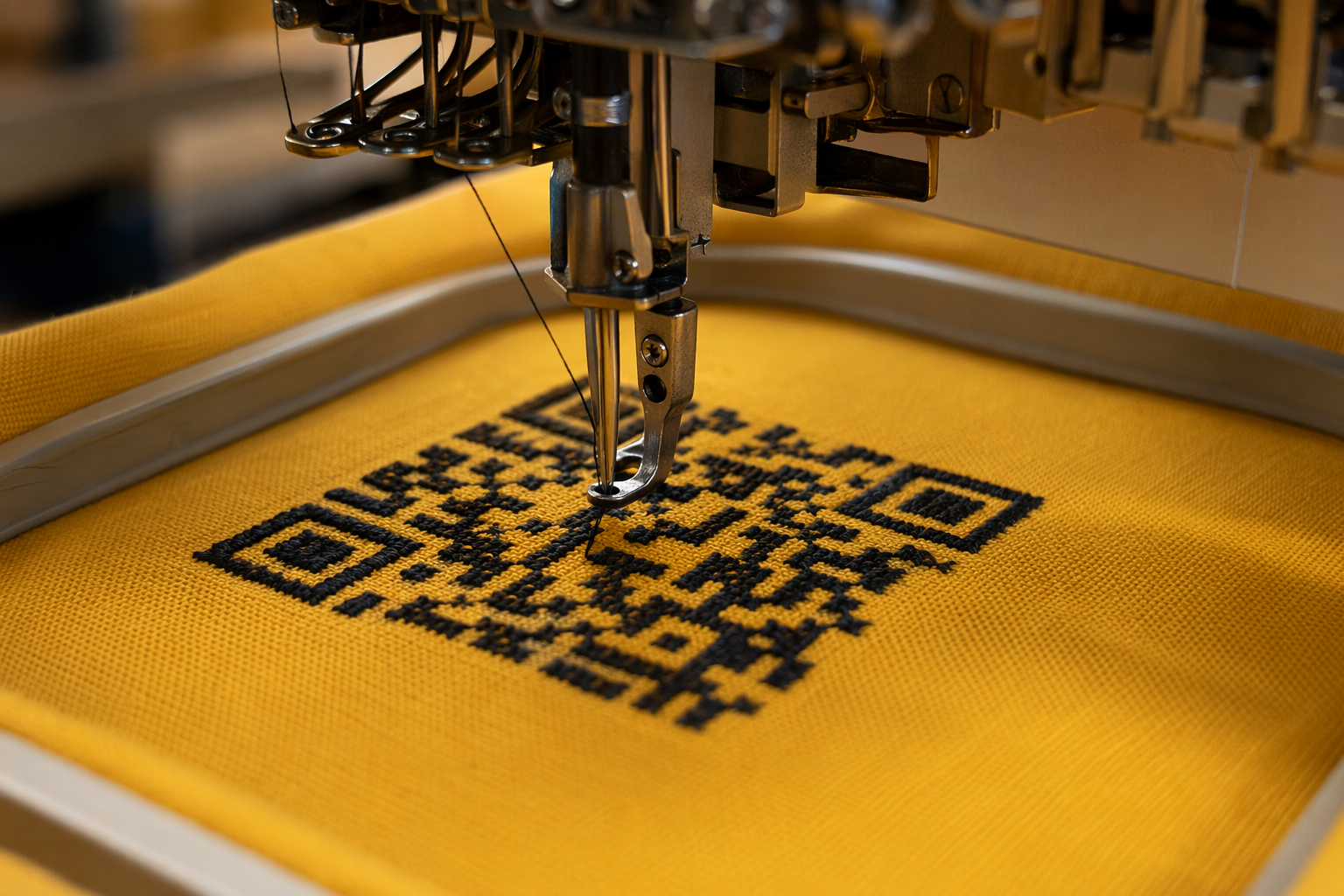
Embroidered QR codes are quietly amazing: thread on fabric, can be sewn into any item, weather-proof, and look custom. Tagback exports your tag as DST (Tajima) and PES (Brother) so you can stitch it on any home or commercial embroidery machine. This is the full guide.
Why embroider a QR?
- Survives anything — washing machine, mud, sun, time. Fabric outlasts plastic.
- Invisible-until-needed — stitched inside a jacket lining or under a collar flap. No advertising your data.
- Custom feel — matches your gear, your brand, your kid's backpack.
- Sewable — onto collars, vests, harnesses, hats, patches, blankets, anything fabric.
- Free — Tagback exports the embroidery file at no charge.
What you'll need
- An embroidery machine — any home or commercial model with USB or wireless transfer. See the format guide below for what your machine accepts.
- A 5×5" / 80×80 mm hoop — the standard size Tagback exports for. Larger hoops work; smaller need a downsized variant.
- Embroidery thread — polyester or rayon. One color (the QR foreground). Background = fabric.
- Stabilizer — medium-weight cut-away or tear-away depending on fabric.
- Fabric — anything weave that holds shape: canvas, denim, cordura, twill, felt. Stretchy knits are harder; use heavy stabilizer.
Step 1 — Download the file
Tagback dashboard → your tag → Designer → Embroidery mode. Choose your machine type (Brother/Babylock/Bernina = PES; Tajima/Janome/most commercial = DST). Pick your thread color. Click Download.
The file embeds:
- Hoop size: 80×80 mm
- Density: 0.4 mm satin fill (parallel rows of zig-zag)
- Underlay inset: 0.3 mm for crisp module edges
- Snake-pattern row order — minimizes jump stitches between modules
- Single thread color (the QR foreground)
Step 2 — Pick the right fabric
| Fabric | Works? | Notes |
|---|---|---|
| Canvas / duck cotton | Excellent | Most popular for backpacks, vests |
| Denim | Excellent | Great visual contrast with white/light thread |
| Cordura nylon | Great | Outdoor-grade; need polyester thread |
| Twill / heavy cotton | Great | Standard apparel fabric |
| Felt | Good | Patches; soft, no fray |
| Linen | OK | Loose weave can distort QR — use stabilizer |
| Knits / jersey | Tricky | Use heavy cut-away stabilizer + ballpoint needle |
| Leather | Possible | Specialty needles, slower speed — best with topical glue |
| Mesh | Skip | Holes break the QR pattern |
Step 3 — Hoop the fabric
- Cut a stabilizer slightly larger than the hoop.
- Place stabilizer in the bottom of the hoop.
- Lay fabric on top, smooth out wrinkles.
- Close the hoop, tighten the screw. Fabric should be drum-tight — flick it with your finger; if it bounces, you're good.
- If embroidering on a finished item (jacket lining, etc.) and you can't get full hoop access, use a small adhesive-backed stabilizer + smaller hoop.
Step 4 — Stitch
Load the file via USB / Wi-Fi / cable. Set speed to medium (600–800 spm on most home machines). The QR has ~3000–4000 stitches depending on data; total time on most machines is 12–18 minutes.
Watch the first row of modules. If you see fabric pulling under the satin fill, you're tensioned wrong — pause, re-tighten the hoop, or reduce thread tension by 0.5 increments.
Step 5 — Test the scan
- Trim jump-stitch threads on the back with sharp scissors.
- Press the embroidered area with a damp pressing cloth and an iron on the underside (never directly on the embroidery).
- Scan with your phone camera, 15 cm away.
- Scans should be instant. If not, see the troubleshooting section below.
Color choices that work
| Thread color | Best fabric color | Notes |
|---|---|---|
| Black | White / yellow / light gray | Highest contrast; recommended |
| Dark navy | White / cream | Slightly softer than black |
| Dark brown | Tan / khaki | Tactical / outdoor look |
| White | Black / navy / forest green | Reverse-contrast |
| Bright yellow | Black | Highest-visibility — great for safety vests |
Avoid: similar-tone pairs (dark gray on black, beige on tan) — scan reliability drops because of low contrast.
Troubleshooting
Scan fails sometimes / works in some light
Usually contrast. Photograph the embroidered area; if it looks low-contrast in the photo, your phone's scanner thinks so too. Re-stitch on a higher-contrast fabric, or use a darker thread.
Modules look misaligned / wavy
Stabilizer too light, or hoop too loose. Re-hoop tighter, switch to cut-away stabilizer (more support than tear-away).
Loops on the back / thread nests
Bobbin tension issue. Re-thread bobbin, clean the bobbin race, oil if your manual recommends it.
Stitches pucker after washing
Use polyester thread (rayon weakens in washing). Pre-wash the garment fabric if it's cotton — prevents shrinkage after the embroidery is in.
Use cases worth their own guide
- Pet collar — embroidered QR on a fabric collar
- Dementia patient jacket — discreet QR sewn into lining
- Kid's backpack — playful, visible safety QR
- DST vs PES — which format does your machine need?
FAQ
Will the embroidered QR really scan?+
Yes — phone camera apps detect QR codes from stitched textures just as they would from print, as long as contrast is sufficient (dark thread on light fabric or vice versa). Tagback's stitch density is tuned for reliable scanning.
What size QR does it actually embroider?+
The Tagback embroidery export fits the QR within an 80×80 mm hoop — large enough for phone scanning from 20+ cm. You can scale it up in your embroidery software for larger items (backpacks, blankets) — stitch density adjusts automatically.
What if my machine only takes JEF or VP3?+
Most embroidery software (Embird, SewArt, free Inkscape Ink/Stitch plugin) can convert PES or DST to JEF / VP3 / EXP / HUS in seconds. The stitch data is universal.
Can I machine-wash items with embroidered QRs?+
Yes — polyester embroidery thread survives ~50+ wash cycles before noticeable wear. Use cold water + mild detergent for longest life. Iron from the back only.
Is there a minimum machine quality needed?+
Any modern embroidery machine ($300+ home models, all commercial) handles this. The 1990s-era cheap embroidery machines may struggle with the satin fill density.
Start protecting what matters
Tagback is free, forever. No subscription. No app needed for finders.
Create your free tag